REST API quickstart: create and drive a lab from curl
Everything the UI does, the REST API (a way for programs to talk to netplex.) can do too. The Studio canvas uses the same endpoints you can call yourself. This guide creates a scoped API token, then uses it with plain curl to list and create labs. No SDK required to get started.
All examples below were run against a live netplex. instance before publishing - the token shape and status codes are real, not illustrative.
Open Settings → API Tokens and create one with the scopes you need - labs:read to list/inspect, labs:write to create or modify. The secret is shown once; copy it now.
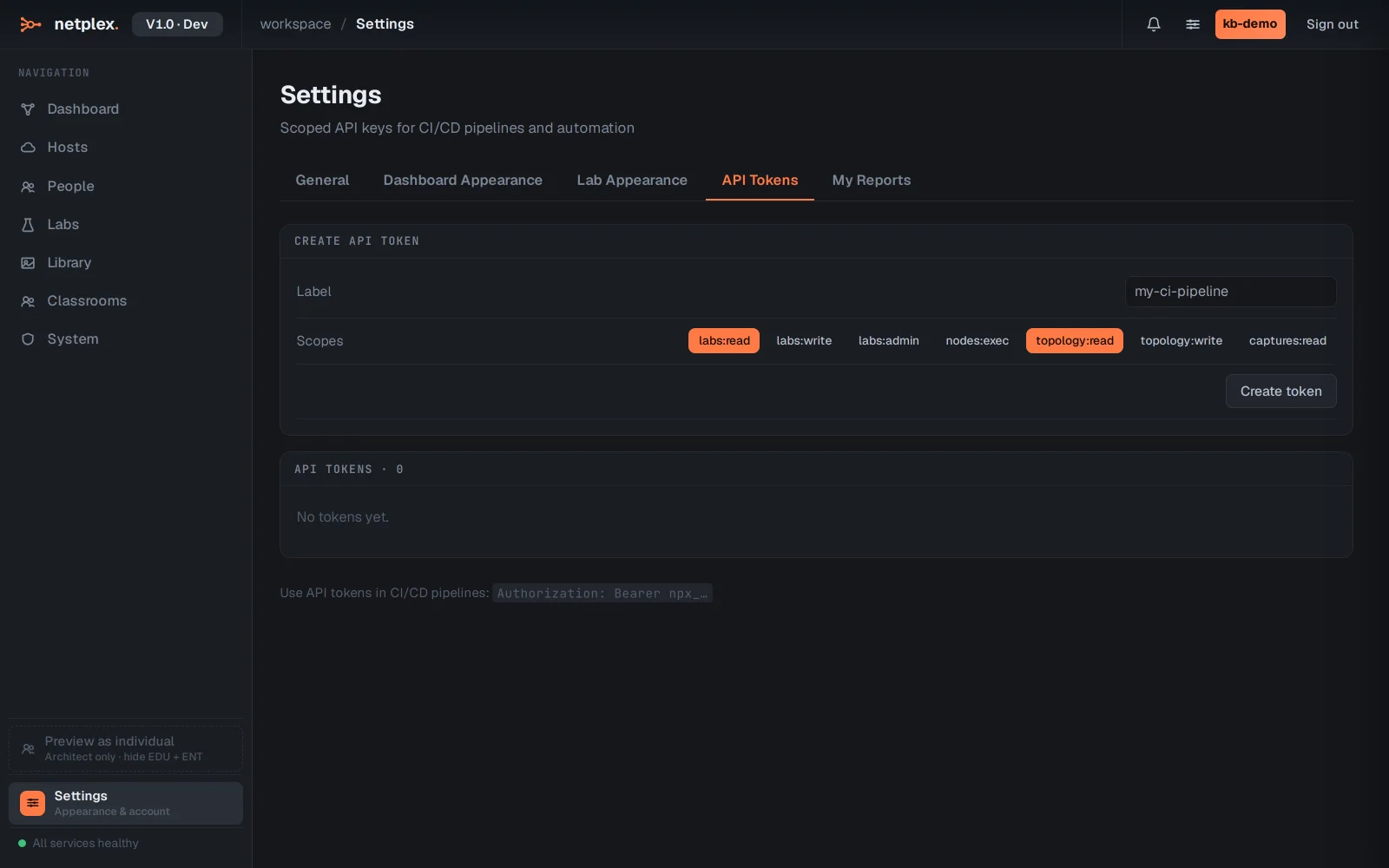
Authenticate (session tokens, if you are scripting a login instead of using a long-lived API token):
curl -sX POST https://your-netplex-host/api/v1/auth/login \
  -H 'content-type: application/json' \
  -d '{"username":"you","password":"..."}'
# → { "access_token": "eyJ...", ... }
Create an API token (what the screenshot above does, in one call):
curl -sX POST https://your-netplex-host/api/v1/auth/api-tokens \
  -H "Authorization: Bearer $ACCESS_TOKEN" -H 'content-type: application/json' \
  -d '{"label":"ci-pipeline","scopes":["labs:read","labs:write"]}'
# → { "id": "...", "token": "npx_xxxxxxxxxxxxxxxxxxxxxxxxxxxxxxxx", "scopes": [...], ... }
Save the token value (npx_...) somewhere safe - it is shown exactly once and works as a Bearer token from here on, no login step needed.
List your labs:
curl -s https://your-netplex-host/api/v1/labs \
  -H "Authorization: Bearer npx_xxxxxxxxxxxxxxxxxxxxxxxxxxxxxxxx"
# → [] (or your existing labs)
Create a lab:
curl -sX POST https://your-netplex-host/api/v1/labs \
  -H "Authorization: Bearer npx_xxxxxxxxxxxxxxxxxxxxxxxxxxxxxxxx" -H 'content-type: application/json' \
  -d '{"name":"CI Smoke Test"}'
# → 201 { "id": "...", "name": "CI Smoke Test", "nodes": [], "links": [], ... }
From here, the same REST surface adds nodes (POST /labs/{id}/topology/nodes), wires links, starts the lab, and reads back status - everything in this Knowledge Base that a scenario "does" is calling these endpoints. A scoped token means your CI pipeline never needs your password: revoke it any time from Settings → API Tokens with no other access affected. See "Create an API token" for the token UI in detail, and "Lab as code" for driving whole topologies from version-controlled files instead of one-off curl calls.